Website SEO Services: A quick intro for Business Owners

Growing your business in today's digital age can seem like an uphill battle. At Nova, we completely understand this challenge. Leveraging our expertise in website SEO services, we shoulder the heavy lifting for our clients, optimising their digital presence and driving their business growth.

However, we firmly believe that when it comes to SEO, knowledge is power. The more you understand about SEO and the strategies that underpin it, the better equipped you'll be to make informed decisions that push your business to new heights.

In this post, we will explore some of the tactics involved in an SEO strategy. If you're up for the challenge of tackling this less-than-simple topic, great, let's dive in and get you up to speed.

On the other hand, if this already sounds like a job for someone else, our team of SEO enthusiasts are here to help.

Now, let's set the scene

Imagine you've just opened a small bakery. You've perfected your recipes, your store is welcoming, and your pastries are mouthwatering. But if your bakery is in a hidden alley, how will customers find you?

Similarly, having an amazing website is just a start. If it's tucked away on the 5th or 10th page of search engine results, your potential customers may never discover you. This is where website SEO services come into play.

Search Engine Optimisation (SEO) is like a beacon in the digital world that guides customers to your website. It's the process of improving your site so that it appears higher in search engine rankings, making it more visible to people who are looking for your product or services via Google, Bing, and other search engines.

That's why it's a game-changer for small businesses struggling to make a mark in the crowded digital space. SEO services can illuminate your digital presence, helping to drive more traffic to your website and potentially boosting your business growth.

Now, let's take a look at what SEO is all about.

Unraveling the SEO Mystery
website SEO services

In essence, SEO is the digital equivalent of placing a giant, eye-catching billboard on the busiest highway in town. It's about making your website stand out amidst millions of others so that when potential customers search for a product or service you offer, your website is one of the first they see.

Think of search engines like Google as the librarian of the internet. When you search for something, Google sifts through countless files in its 'library' and presents you with the most relevant results.

SEO is the strategy that makes sure your 'file' or website is easy to find, read, and categorise, making it more likely to be presented to someone who's searching for information related to what you offer.

It's essential for all online businesses because, without it, your website might get lost in the sea of information on the internet, regardless of how high-quality your content or services are.

By employing good SEO practices, you can increase the visibility of your website, attract more traffic, and ultimately, grow your business. So, no matter how small or large your company is, investing in website SEO services is like investing in a highly effective, constantly available online billboard for your business.

Crafting your SEO Strategy

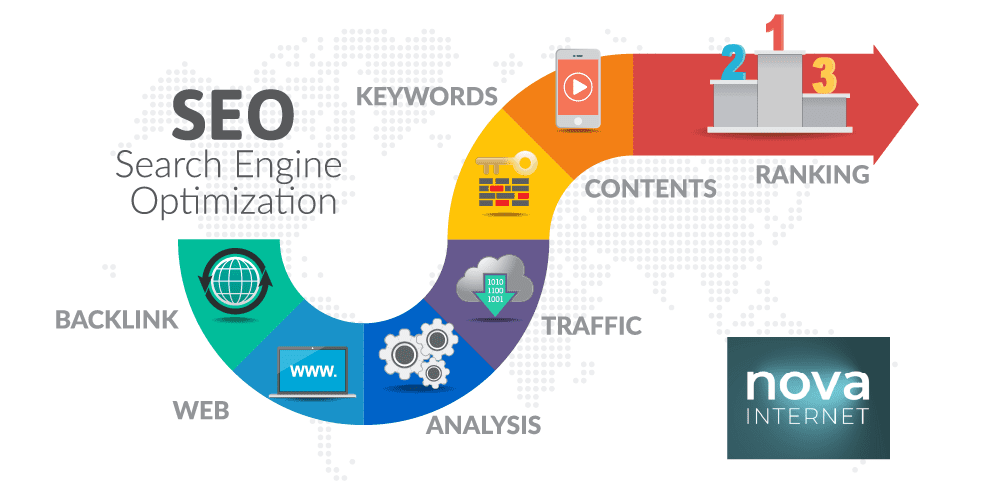
Creating a solid SEO strategy might seem like a daunting task, but breaking it down into key components can simplify the process. Here's a look at some of the essential aspects that your SEO strategy should hinge on:

  1. Keyword Research: This is the cornerstone of SEO. It involves identifying the words and phrases that your target audience uses when searching for products or services similar to yours. By incorporating these into your content, you can increase your chances of appearing in search results when these keywords are used.
  2. Competitor Analysis: Knowing what your competitors are doing can help you craft a more effective SEO strategy. This involves examining their keyword usage, the structure of their websites, their backlink profiles, and their content strategy to identify strengths and weaknesses.
  3. On-Page Optimisation: This involves optimising elements on your website such as titles, headings, and content to improve its visibility in search engine results. Effective on-page optimisation includes using keywords in your content and meta tags, optimising images, and ensuring your site is fast to load and mobile-friendly.
  4. Off-Page Optimisation: This includes actions taken outside of your website to improve its visibility, such as acquiring backlinks from other reputable websites. These serve as endorsements for your site, improving its reputation in the eyes of search engines.
  5. Content Development: Quality content is the bedrock of a successful SEO strategy. This involves creating valuable, engaging, and keyword-rich content that resonates with your target audience, encourages them to stay on your site longer, and increases the likelihood of conversions.

Investing in website SEO services can help you cover all these bases effectively, ensuring your website stands out in the crowded digital landscape and drives your business growth.

Keyword Research – Your First Step to Success

Researching and choosing the right keywords is a critical first step in your SEO journey, as these terms guide search engines to your website in response to user queries. Here are some practical tips and tools to boost your keyword research game:

  1. Understand Your Audience's Intent: The words your target audience uses while searching are your potential keywords. Understand their needs, pain points, and what solutions they are searching for. Tools such as AnswerThePublic provide insights into commonly asked questions and search terms in your industry.
  2. Use Keyword Research Tools: Tools like Google Keyword Planner, SEMRush, or Ahrefs can show you the search volume (how many people are searching for that keyword) and competition (how many websites are targeting that keyword).
  3. Choose High-Relevance Keywords: Always choose keywords that are highly relevant to your business and the content on your webpage. Irrelevant keywords may attract traffic, but they won't likely convert into customers.
  4. Focus on Long-Tail Keywords: These are phrases of three or more words and are specific to what you are selling. They may have lower search volumes, but they often have less competition and higher conversion rates.
  5. Consider Keyword Difficulty: Some keywords are highly competitive, making it hard for your website to rank on the first page. Tools like Moz’s Keyword Explorer provide a keyword difficulty scoring system to guide your decisions.
  6. Check out Your Competitors: Look at which keywords your competitors are ranking for. SEMRush's 'Organic Research' tool can give you insights here.

Remember, keyword research isn't a one-time task. It’s an ongoing process that needs regular reviews and updates, to stay in tune with trends, and your evolving business objectives. It's this meticulous attention to keyword detail that makes website SEO services a worthy investment for business growth.

Competitor Analysis – Learning from the Best

Analysing your competitors' SEO strategies can provide invaluable insights and potentially give you a competitive edge. By understanding what keywords your competitors are targeting, which ones are yielding results, and how they structure their on-page and off-page SEO, you can reverse-engineer their success to fuel your own.

For instance, a competitor consistently occupying the top position for keywords related to your business might be utilising a more refined keyword strategy, better content, or stronger backlinks. Tools like SEMRush's 'Organic Research' can reveal their highest-performing keywords, providing you with a list of potential targets for your own content. You might also identify gaps in their strategy that you can capitalize on, such as valuable long-tail keywords they have overlooked.

Moreover, analysing their website structure, meta tags, and backlinks can highlight areas for improvement on your own site. If they have a faster site speed or more user-friendly design, it could be time to consider an upgrade.

Similarly, if they have high-quality backlinks from reputable sources, it may indicate a need to bolster your own link-building efforts.

In essence, competitor analysis is not about copying, but about learning. It helps you understand the SEO landscape in your industry and adapt your strategy to navigate it more effectively. These insights make website SEO services an indispensable tool in your arsenal for business growth.

Technical SEO – The Backbone of Your Website

Technical SEO is the cornerstone of a robust online presence, ensuring that your website not only appeals to users but also meets the sophisticated algorithms of search engines. This primarily involves optimising title tags, meta descriptions, and internal links.

Title tags are the headlines you see on search engine results pages (SERPs). A well optimised title tag should be concise yet descriptive, incorporating your target keywords to signal relevance to both users and search engines.

Meta descriptions offer a brief summary of the page content, serving as a digital 'elevator pitch' to potential visitors. While they don't directly influence rankings, compelling meta descriptions can boost click-through rates, driving more traffic to your site.

Internal links are another key aspect of technical SEO, connecting various pages within your site. Besides improving user navigation and distributing 'link juice' to help boost the ranking of other pages, a well-structured internal linking strategy can enhance your site's crawlability, making it easier for search engines to index your content.

Moreover, these elements also contribute to site speed and user experience. For instance, a webpage with optimised title tags, meta descriptions, and a logical internal linking structure will load faster and provide a smoother browsing experience, leading to lower bounce rates and higher user engagement.

In essence, technical SEO, powered by website SEO services, not only makes your site more appealing to search engines but also enhances the user experience, a key factor in attracting and retaining visitors.

It is indeed a vital tool for business growth in today's digital landscape.

Content Development – More Than Just Words

High-quality, SEO-optimised content forms another of the pillars of a successful digital growth strategy. It's not just about stuffing articles with keywords; it's about providing genuine value to your audience. Website SEO services often emphasise this significant aspect of SEO.

Blog posts, for instance, allow businesses to establish thought leadership, address customer queries, and delve into topics related to their industry. Consistently publishing informative, relevant blog posts can boost your site's authority and visibility, attracting a steady stream of organic traffic.

Landing pages serve a different purpose. These are typically designed to drive a specific action, such as signing up for a newsletter or making a purchase. A well-optimised landing page with a clear call-to-action can significantly improve conversion rates, directly contributing to business growth.

Infographics, on the other hand, provide a visually engaging way to present complex data or processes. By combining compelling visuals with key information, infographics can enhance user understanding and recall, leading to higher engagement and shareability.

Videos are another powerful content format. Given the increasing preference for video content among internet users, incorporating videos into your content strategy can greatly enhance user engagement and retention, ultimately leading to higher rankings.

In short, diversifying your content types and aligning them with SEO best practices can significantly increase your site's appeal to both your target audience and search engines, driving more traffic and fostering business expansion.

Link Building – Strengthening Your SEO Strategy

Link building is another crucial component of SEO strategy that businesses should not overlook. It refers to the process of acquiring hyperlinks from other websites to your own.

Search engines like Google use these links to crawl the web; they will crawl the links between the individual pages on your website, and they will crawl the links between entire websites.

There are many techniques for building links, and while they vary in difficulty, SEO experts agree that link building is one of the hardest parts of their jobs.

One method to acquire high-quality backlinks is through content creation and promotion.

You create compelling, unique, and high-quality content that others will naturally want to reference and link to and tell people about it.

Another strategy is through reviews and mentions - put your product, service, or site in front of influencers in your industry, such as popular bloggers or people with a large social media following. Guest blogging can also help in building valuable industry connections and exposing your brand to a larger audience.

Link building not only helps in improving the visibility of a website in search engines but also helps in getting traffic from other websites linked to your site. This approach is elemental for any website SEO services to enhance their client's site ranking and, consequently, boost business growth.

Reporting & Analysis – Measuring Your Success

Keeping track of your SEO efforts is just as important as implementing them. Without proper monitoring and analysis, you'd be driving blind, unsure whether your tactics are producing the desired results or falling flat.

Thankfully, today's digital landscape offers an array of tools that allow businesses to accurately track, analyse, and optimise their SEO strategies.

Google Analytics, for instance, is a free tool that provides comprehensive insights into your website traffic, user behaviour, and a wealth of other useful data.

It lets you see how visitors find your site — whether through organic search, social media, or direct visits — giving you a clear picture of which channels drive the most traffic.

Another powerful tool is Google Search Console, which allows you to monitor your website's presence in Google's search results.

It provides data on your site's performance, including click-through rates, keyword rankings, and issues that might affect its visibility.

Besides Google's tools, there are also platforms like SEMrush, Moz, and Ahrefs that offer more in-depth SEO analytics, including backlink analysis, SERP rankings, and keyword research.

Tracking various metrics such as organic traffic, bounce rate, conversion rate, and ranking keywords can provide insightful data to further optimise your SEO strategy.

These analytics help identify strengths and weaknesses in your strategy, providing guidance on where to focus your efforts. Remember, SEO is a long-term game, and consistent tracking and analysis are the keys to staying ahead. By leveraging these tools and data, businesses can fully harness the benefits of website SEO services, driving meaningful traffic to their site and facilitating steady business growth.

And it's a simple as that!

In the digital era we live in, employing SEO is no longer an option but a necessity for businesses, especially small ones, striving to carve out a niche in the market.

Website SEO services are not just about increasing your online visibility; they're about fostering growth, scaling operations, and driving sustainable success. SEO, when done right, can be your business's greatest ally, magnetising traffic to your site, increasing conversion rates, and ultimately, boosting your bottom line.

So, don't hesitate! Start implementing the insights you've gleaned from this article into your SEO strategy and keep refining it for the best results.

Remember, SEO is a marathon, not a sprint, and every tweak and adjustment brings you one step closer to your goals.

If however, you feel overwhelmed, remember we're here to help. Don't hesitate to get in touch if you'd prefer us to navigate the SEO maze for you.

Worcester Design Agencies: Is local all that important?

Ever felt like digital marketing and web design were doing the tango at the speed of light on a rollercoaster? Believe me, you're not alone!

The digital terrain is evolving faster than a chameleon on a rainbow. But fret not, dear reader. This is where Worcester design agencies step into the spotlight.

They say home is where the heart is, and for your business, it's no different.

Locality can be the secret ingredient in your website's secret sauce. So, hold on to your hats, Worcester businesses!

Let’s dive into the exciting world of local web design and why it should play a part in your selection process.

The Magic of Local Web Design Agencies

Ah, Worcester design agencies! They’re not just your friendly neighbours with a knack for killer design. They're bespoke wizards, armed with the local knowledge to give an authentic voice to your business.

You see, they understand Worcester like no others, its charm, its unique quirks, its people.

They can seamlessly weave this local ethos into your web design, making your brand truly resonate with the Worcester community.

Ever tried explaining Worcester’s peculiar pronunciation to an outsider? ...like the sauce, right?

Then you'll understand the value of having a local agency that gets it.

They're familiar with local trends, customer behaviours, and the business ecosystem.

It's not an overstatement to say that Worcester design agencies can be your beacon in the foggy realm of digital marketing. They have a unique ability to blend creativity with local relevance, ensuring your website doesn't just look stunning but also feels like home.

So, if you're planning to cut a slice of the Worcester market pie, a local web design agency might just be your secret weapon!

The Power of Local Knowledge

Understanding the local market, its trends, preferences, and culture is a bit like being handed the cheat codes to a video game. It gives you the edge over competitors who are oblivious to the nuances of the Worcester world.

Let's face it, local market understanding is the secret handshake that gets you in with the cool kids or at least the local ones.

Worcester design agencies have their ears to the ground. They're not just creating pretty graphics, they're out there, experiencing the city, understanding what makes it tick. They know the latest ‘in’ things, the trending brunch spots, the bars and the hustle and bustle.

They understand the pulse of Worcester, its culture, and its vibe.

They also know what Worcester folks love, what they dislike and what they absolutely adore. They're like Worcester whisperers, interpreting this local wisdom into your web design.

This dedication to getting the local flavour right ensures your website doesn’t just exist, it belongs. It becomes a part of the Worcester tapestry, respected and loved by the local community (if that's what you're after).

Simply put, local knowledge is the magic dust that can transform your website from a generic online presence into a thriving, dynamic digital platform that resonates with the heart of Worcester.

So, when deciding who gets to wave the digital wand over your website, remember - local web design agencies don’t just do magic, they are the magic!

The Magic of Face-to-Face Interaction

Worcester design agencies

While the world has gone gaga for technology and the convenience of virtual meetings, nothing beats the magic of in-person, face-to-face meetings. When you collaborate with a local Worcester design agency, you're not just an email or a voice on a call, you’re, well, a real person! You can pop in for a cup of coffee and put faces to the names behind your website’s snazzy transformation.

These meetings are not just about clinking coffee mugs and comparing notes on the latest ‘IT’ spot in Worcester. They’re about building rapport, establishing trust and fostering a mutual understanding.

Body language, eye contact, and those spontaneous lightbulb moments all play a significant role in shaping the perfect outcome for your business.

Local Worcester design agencies can pick up on these subtle non-verbal cues and nuances that might get lost in translation over email or phone calls.

Think of it as an extra layer of communication, a secret Morse code if you will, creating a deeper connection and understanding.

So, when you're thinking about who should be creating your web magic, remember - nothing beats the charm and charisma of local, face-to-face interactions.

After all, the secret ingredient to a successful web design is not just about understanding your business, it's about understanding you!

Aligning Objectives: The Art of Thinking Like Your Client

When it comes to creating a website that truly resonates with your audience, understanding your business objectives is paramount. But here's the catch - just understanding them isn't enough. What sets Worcester design agencies apart is our ability to think like you do.

Let's get this straight. We're not talking about mind-reading here (although, wouldn't that be cool?). We're talking about fully immersing ourselves in your business ethos, your goals, and your vision.

It's like temporarily moving into your mind space, exploring every nook and cranny, and then emerging with the essence of 'You' that we embed into your web design.

This process, this 'Art of Thinking Like Your Client', doesn't just help us tailor your website to your needs, it helps us make it as unique and authentic as your business. And that’s when the magic happens.

That's when you don't just exist online, but shine through, loud and clear.

So trust us, your local Worcester design agencies, to bring your vision to life on the web, because we don't just understand you - we think like you!

Now, let's move the spotlight to Nova Internet - your friendly neighbourhood Worcester design agency! We are in the business of digging deep, of peeling back the layers of your business until we strike gold – understanding the core of your company culture, your objectives, the constraints you face, and the target customers you seek to captivate.

We don't just stop there, no, sir!

We sink our teeth into the market space you operate in, familiarising ourselves with its ebbs and flows, its unique challenges and opportunities.

We pride ourselves on our ability to drink from the firehose of information and transform it into a potent web design strategy that truly represents who you are.

With Nova Internet, you're not just getting a website, you're getting a digital embodiment of your business that sings your song in the vast concert hall that is the Internet.

Trust us, we'll hit the right notes.

Local SEO: The Key to Conquering Worcester

Local SEO, or should we say, your magic carpet ride to local dominance, is a focused strategy that aims to increase your visibility in local search results on Google.

Picture this: when folks in Worcester are searching for '[your service] near me', bam! Your business is right there, waving from the top of the search results.

This is the power of Local SEO. It's like having a spotlight on your business in the digital space, making you the star of the local stage.

But it's not just about fame and glory.

Local SEO is an essential tool for gaining a competitive edge in the Worcester market.

It ensures that when customers are looking for services you provide, you’re not just a choice, but the choice. It's like having a megaphone in a sea of whispers, making your message loud and clear to local customers.

So if you're keen on waving hello to more local leads and saying goodbye to being lost in the crowd, let's get the ball rolling on your Local SEO strategy with Nova Internet - your trusted Worcester design agency.

Isn't it funny how you found this blog?

Picture this: You're sipping on your morning coffee, or perhaps that's tea if you're more of a traditionalist, and you're wondering, "How do I boost my business in Worcester?" A quick Google search, and voila, you land right here in our virtual living room.

That dear reader, is no accident. It's the beauty of local SEO at work.

When you typed those keywords into your search bar, our local SEO strategy was like a friendly neighbourhood spider, spinning a web that caught your query. And just like that, you were guided to this very blog post, the digital equivalent of our warmly lit storefront window in Worcester's digital high street.

You see, if our local SEO magic can guide you, a savvy business owner, to our post from the vast expanse of the internet, it can do the same for your customers too.

This is the power, the charm, and the sheer wizardry of working with Worcester design agencies like us.

So, pour yourself another cup, and let’s chat about the future - a future where everyone in Worcester knows your name.

And that's all folks!

In a nutshell, my friends, choosing a local design agency like Nova Internet isn't just a smart choice—it's the smartest one for your business in Worcester.

Our local SEO strategy is a finely-spun web, ready to catch your audience's queries and guide them straight to your virtual doorstep.

We're not just any agency; we're a Worcester design agency, deeply rooted in our community. We understand the local market, its unique quirks, and its charming idiosyncrasies.

These insights enable us to create highly targeted strategies that resonate with your local customer base, making your business stand out in the Worcester digital high street.

So, the next time someone sips their morning brew and wonders, "Who should I choose for my (insert anything) in Worcester?" your business will be their definitive answer.

Now, isn't that a future worth toasting to?

With over 20 years of experience on the digital battlefield under our belt, we at Nova Internet have honed our skills to perfection. We've been the trusty sidekick to countless businesses in Worcester, helping them climb the ranks in their local markets.

Just as a maestro conjures a symphony from a sea of notes, we weave together intricate strategies that catapult your brand into the limelight.

Our extensive expertise isn't just a feather in our cap; it's a testimony to the trust Worcester businesses have placed in us over two decades.

These years have given us a deep understanding of the local business landscape, enabling us to craft tailored strategies that hit just the right notes with your audience. After all, in the complex dance of the digital world, it's the local twirls that make all the difference.

And... that's a wrap

So folks, if you're seeking a local touch with a global reach, look no further.

Nova Internet, your trusted Worcester design agency, is just a click away. We’ll turn your digital dreams into a reality, giving your brand the edge it needs to shine brighter than a supernova.

Ready to launch your brand into the digital stratosphere? Get in touch with us today and let's create your digital future, together.

worcester design agencies

Logo Design: DIY Tips for Entrepreneurs and Hustlers alike

Let's face it, we weren't all born with an innate skill for design, and for those of us who were, well, aren't you lucky!

But for the rest of us mere mortals, the world of logo design can seem as intimidating as a Picasso masterpiece. And when those pound signs start flashing in front of your eyes, you can't help but wish for a fairy god-designer to swoop down and magically manifest an irresistible logo.

Fear not, brave entrepreneur! Your rags-to-riches story won't be halted by a logo-less nightmare. This guide is here to introduce you to your fairy godmother of logo design -- the world of free tools.

But, remember, in the realm of design, a tool is as good as its operator, not its price tag.

So, let's dive in, shall we?

Say aye, all aboard!

Imagine your brand is a ship sailing through the vast ocean of commerce, where every wave is a potential customer, and each competing ship is vying for its attention.

Your logo is the flag that flies high on the mast, proudly announcing your presence and identity. It's the first thing that catches the eye of those elusive wave customers, and if it's not distinctive, well-designed and memorable, your ship might as well be invisible in this sea of competition.

So, it's not just about having a flag - it's about having a flag that stands out!

A well-executed brand design is the difference between being a whimsical paper boat bobbing aimlessly in a pond, and a majestic galleon commanding the ocean.

It's what separates the side hustles from the serious enterprises, the hobby projects from the bona fide businesses.

With the right tools and a dash of creativity, you can hoist a flag that is truly worthy of your brand.

Hobby vs. Brand in Logo Design

Think of a hobby as an indulgence that you savour in your solo time, a personal refuge that gives you joy but isn't necessarily meant to resonate with anyone else.

A brand, on the other hand, is a melody that you play out loud, designed to strike a chord with your audience, to solve a problem they are facing, and make their lives a tad bit better, simpler, or more interesting.

Let's put this into perspective with a colourful anecdote, shall we?

Meet Bob. Bob loves making bespoke wooden furniture. It's a craft he honed over countless weekends, eventually perfecting the art of designing minimalist, sturdy, and aesthetically pleasing wood things.

He thrived in his hobby, but it was something he did for himself, tucked away in his garage.

Now, let's say Bob decides to share his talent with the world and establish a brand.

He isn't just making furniture anymore; he's solving a problem.

Bob's offering a solution to those who are tired of mass-produced, impersonal furniture, and yearn for something crafted with care and personality. He's targeting an audience that values craftsmanship and sustainable materials.

Bob's logo, the face of his brand, needs to reflect this ethos. It's no longer just about Bob and his passion; it's about his audience and their needs.

In this transition from hobby to brand, remember the role of your logo. It's the visual lighthouse, guiding your audience towards your brand in a sea crowded with competitors.

Armed with the right free tools, you can create a logo that encapsulates your brand's story and resonates with your audience.

So, let's venture forth, shall we?

The ABCs of Branding: Consistency and Recognition

Before we dive headfirst into the realm of free logo design tools, it's crucial to grasp the importance of two fundamental elements of branding: consistency and recognition.

Consistency, in branding terms, is like that old pair of jeans you love - comfortable, reliable, and always fits just right. It involves maintaining a steady and dependable image across all platforms, ensuring that your brand's voice, aesthetics, and principles remain unvarying.

It's all about making sure your brand is always wearing its favourite pair of jeans, so to speak.

On the other hand, recognition is your brand's secret handshake.

It's about creating visual, verbal, and emotional associations that your audience instantly ties to your brand.

When done right, recognition can turn into brand recall, where your customers remember your brand even when they're in the deepest dungeons of their memory palace.

Now, a story about a famous brand that got it just right.

The Golden Arches: A Tale of Consistent Recognition

Ah, McDonald's - the fast-food giant that has its golden arches recognized far and wide. But have you ever wondered why a simple "M" has such a powerful recall?

The secret lies in consistency and recognition.

Years ago, McDonald's embarked on an ambitious rebranding program. They wanted to modernize, but they also knew they needed to retain the familiarity their customers loved.

The golden arches, originally part of the architecture of the first McDonald's restaurant, became the hero of the story.

They simplified their logo to the iconic "M" we know today, and it worked!

McDonald's understood that their brand wasn't just about burgers and fries; it was about an experience, a feeling of comfort, and a sense of familiarity.

They remained consistent with their symbol while modernizing the elements around it, achieving a successful rebrand while maintaining robust brand recognition.

So, as you embark on your journey of logo design remember, to be like McDonald's - be consistent, be recognizable, and don't be afraid to supersize your branding efforts.

Now, back to our logo design quest!

Logo Design Tools

Logo design

Welcome to the magical world of logo design tools, where even a small business or side hustle can morph into a recognizable brand. You don't need to have a Scrooge McDuck-sized fortune, or the artistic prowess of Michelangelo to craft a logo that sticks.

In this digital age, there are a plethora of free tools at your disposal that can make your logo design journey smoother than a well-blended milkshake.

Always remember, these tools are as powerful as their operators. So, buckle up, my entrepreneurial Picasso, it's time to dive into the treasure trove of free logo design tools!

Canva

Canva is like the friendly neighbour of a logo maker, always there to lend a helping hand (or a perfectly designed template). With its user-friendly interface and intuitive features, logo creation becomes as easy as a delicious homemade pie.

And speaking of pie, just imagine the sweet aroma of a freshly baked apple pie, with its golden crust and warm filling... Mmm... Now that's the kind of satisfaction you can expect when using Canva for your logo design needs.

LogoMakr

Simplicity is the name of the game with LogoMakr. Its intuitive interface and collection of over one million graphics have garnered a dedicated user base. The story of 'Baked and Wired', a home bakery that used LogoMakr to design a logo that went viral, is a testament to its effectiveness.

LogoTypeMaker

A true gem in the world of AI-powered tools, LogoTypeMaker boasts a robust algorithm that generates unique logo designs based on your preferences. It's been the secret weapon of over 3 million small businesses and solopreneurs worldwide.

Logomaker by VistaPrint

Introducing VistaPrint's Logomaker, a logo creation tool so intuitive, it feels like it was designed by a psychic with an uncanny understanding of your brand vision.

With an extensive collection of templates tailored to every industry imaginable, Logomaker ensures that your logo perfectly captures the essence of your business.

It's like having a design genie at your fingertips, ready to grant your creative wishes and bring your brand to life in ways you never imagined.

So go ahead, explore the limitless possibilities and unleash your creativity with VistaPrint's Logomaker.

Designhill Logo Maker

Designhill Logo Maker is like the Swiss Army knife of the logo design world - versatile, functional, and surprisingly easy to use.

This free online tool offers a plethora of choices, so you can craft a logo that is as unique as your side hustle. Just feed this creative beast with a few details about your business, and watch it whip up a feast of logo options faster than you can say "brand identity".

Moreover, it allows you to see your logo in action, showing how it would look on business cards or T-shirts.

So, if you have an insatiable appetite for creativity but are slightly short on the moolah, Designhill Logo Maker has got you covered.

TailorBrands Logo Maker

Meet TailorBrands Logo Maker, the tool that's basically the graphic design equivalent of a smoothie machine - throw in your preferences, hit blend, and voila, a delicious, bespoke logo is ready for consumption.

Packed with a plethora of customizable designs, this handy tool puts the power of creativity right into your hands just like Thor's hammer (but with a lighter touch).

Simply input your business name and industry, sprinkle in a little bit about your brand's personality, and watch as the tool crafts a logo that's as unique as your business.

Whether you're starting a new side hustle or looking to revamp your small business's image, TailorBrands Logo Maker is your one-stop shop for a logo that's as brilliant and individual as your vision.

Go ahead, give it a spin and see where your creativity takes you.

Adobe Express Logo Maker

Welcome to Adobe Express Logo Maker, a creative powerhouse that is the logo design equivalent of a treasure chest full of branding jewels. Think of this tool as your personal logo genie, ready to grant your brand image wishes at the click of a button.

Adobe Express's intuitive interface ensures that even non-designers will feel like Picasso, with a variety of templates, fonts, and colour palettes at their disposal. Simply input your business details, choose your stylistic preferences, and voila, a logo that screams "Look at me" is born.

But don't be fooled by its user-friendly nature – Adobe Express packs a punch when it comes to features. From thousands of professionally designed icons to high-quality typography, this tool has all the bells and whistles to help your logo stand out in the cluttered landscape of brands.

So, whether you're a side hustler launching your first venture or an established small business looking to add some spice to your branding, Adobe Express Logo Maker has got your back.

Unleash your creativity and let Adobe Express transform your ideas into a logo that is as innovative and unique as your business.

Placeit Logo Maker

Let's strut into the world of Placeit Logo Maker, the unsung hero of logo design that's as reliable as your morning coffee. This nifty tool is like your business's fairy godmother, turning the ordinary into extraordinary and making your logo dreams come true.

With Placeit, you're not just designing a logo – you're crafting a story that resonates with your audience. And the best part? You don't need to be a seasoned designer to use it. It's as simple as choosing a template, customizing it with your brand details, and clicking download.

The result? A logo that not only looks professional but also reflects the essence of your business.

Placeit's charm lies in its versatility. Whether you're a solopreneur looking to make a splash in the market or a small business aiming to revamp your brand image, Placeit has the tools you need. With a vast library of icons, fonts, and colours, you can design a logo that's as unique and dynamic as your business.

So, roll up your sleeves and dive into the creative pool with Placeit Logo Maker. It's time to create a logo that leaves an indelible mark.

Looka Logo Maker

Next up, we're walking down the digital aisle of logo design towards Looka Logo Maker. Imagine Looka as an artist with a beret and paintbrush, only it's you wearing the beret and wielding the paintbrush. This AI-powered tool is like having your personal Da Vinci, creating logos that are masterpieces in their own right.

Looka brings to the table an easy-to-use interface that makes designing a logo as effortless as ordering your favourite takeout. With a seemingly endless collection of fonts, colours, and symbols, Looka lets you transform your logo vision into a reality, with no design degree required.

Whether you're a dog walker with a flair for the dramatic or a tech startup ready to conquer the world, Looka adapts to your needs. It's all about crafting a logo that captures the unique spirit of your business. So, slip into your creative shoes and start designing with Looka Logo Maker. Your brand identity is just a few clicks away.

Turbologo Logo Maker

Fasten your seatbelts as we zoom into the world of Turbologo Logo Maker, the design equivalent of a Formula 1 car. Speed and precision are the name of the game here, with Turbologo promising a quick yet high-quality logo design experience.

Imagine Turbologo as your friendly, ultra-efficient pit crew, armed with a toolbox brimming with fonts, icons, and colour palettes. Whether you're a sassy boutique owner or an ambitious app developer, Turbologo caters to all with its user-friendly interface and vast design library.

And the best part? No need for a driver's license. Turbologo's intuitive design process makes it as easy as cruising down a highway on a sunny day. All you need to do is input your preferences, sit back, and watch as Turbologo crafts a logo that fits your brand like a glove.

So, put the pedal to the metal and kickstart your logo design journey with Turbologo Logo Maker. The finish line? A stunning logo that will get your business racing ahead of the competition.

And that's a wrap...

And there you have it folks, a pitstop tour of the best and brightest free tools to design your very own logo. A little sweat, a dash of creativity, and these nifty tools are all you need to visualize your brand's spirit. But remember, tools are only as good as their operators. If you're feeling a little lost or you're ready to shift gears and take your brand to the next level, we're here to lend a helping hand.

At Nova Internet, we're more than just your average digital agency. We're your co-pilots, your pit crew, your partners in this branding race. From fine-tuning your logo design to setting up an engaging website and propelling your digital marketing efforts, we've got your back.

So, why wait? Get in touch with us today and let's embark on this exciting branding journey together. After all, your brand deserves nothing less than the best. And we're committed to delivering just that.

Transform Your Digital Presence with the Help of an Internet Marketing Agency

For businesses looking to grow their digital presence and drive success, the help of an internet marketing agency can be invaluable. Working with an agency provides the expertise, technology, and resources needed to develop and execute a comprehensive digital marketing strategy tailored to the specific needs of the business.

An internet marketing agency can provide a range of services such as web design, SEO, content creation, social media marketing, and more. With the right internet marketing agency, businesses can gain the knowledge, resources, and support to take their digital presence to the next level.

The Advantages of Outsourcing Digital Services

In today's digital age, having a strong online presence is crucial for businesses of all sizes. However, managing digital services in-house can be a time-consuming and challenging task, especially for small to medium-sized businesses that don't have the resources or expertise to handle complex digital marketing campaigns.

That's where outsourcing digital services to a professional agency like Nova Internet comes in.

Here are some of the key advantages of outsourcing your digital services:

1. Access to Expertise

When you outsource your digital services to a reputable agency like Nova Internet, you gain access to a team of experts who have the knowledge and skills to handle complex digital marketing campaigns. These professionals have the latest tools and technologies, as well as years of experience, to help you achieve your business objectives.

2. Cost Savings

Outsourcing your digital services to an agency can be cost-effective since you don't have to hire additional staff or invest in expensive software and equipment. Moreover, you can benefit from economies of scale, as the agency can negotiate better deals with suppliers and pass on the savings to you.

3. Allow you to Focus on your Core Business Activities

By outsourcing your digital services, you can focus on your core business activities, such as developing new products, improving customer service, and expanding your operations. You can rest assured that your digital marketing campaigns are in good hands and focus on what you do best.

4. Scalability and Flexibility

An internet marketing agency like Nova Internet can help you scale your digital marketing efforts quickly and easily, depending on your business needs. You can adjust your digital marketing campaigns according to market trends, consumer insights, and business objectives without having to invest in additional resources.

5. Improved Efficiency and Productivity

Outsourcing digital services can improve the efficiency and productivity of your business by allowing you to concentrate on your core competencies. This, in turn, can lead to better quality products, improved customer satisfaction, and increased revenue.

6. Risk Mitigation

Outsourcing digital services to a professional agency can mitigate the risk associated with managing complex digital marketing campaigns. These agencies have the knowledge and expertise to manage risks effectively and protect your brand's reputation in the market.

7. Gives your Business a Competitive Edge

By outsourcing your digital services, you can benefit from the latest technologies, tools, and techniques that can give your business a competitive edge in the market. These agencies have a deep understanding of the digital landscape and can help you stay ahead of the competition.

The Importance of Focusing on Your Core Business

As a business owner, it is important to focus your energy and resources on your core business functions. This means dedicating your time to the activities that generate revenue and bring in profits for your business. 

However, digital services such as web design and digital marketing can be time-consuming and require expertise that your team may not have.

This is where outsourcing digital services can be beneficial. By entrusting your website and digital marketing to a professional agency such as Nova Internet, you free up your time and resources to focus on your core business.

Outsourcing your digital services allows you to access expertise that you may not have in-house. Digital agencies have experienced professionals who specialize in web design, search engine optimization, social media marketing, and other digital services. This expertise can help your business improve its online presence and increase visibility to potential customers.

Furthermore, by outsourcing digital services, you can ensure that your business stays up to date with the latest digital trends and technologies. Digital agencies such as Nova Internet stay on top of the latest digital trends and can help your business adopt new technologies to improve your online presence.

Overall, outsourcing your digital services allows you to focus on what your business does best while leaving your online presence in the hands of experienced professionals. This can ultimately lead to improved efficiency, increased revenue, and a more successful business.

The Role of Internet Marketing Agencies

In today's digital age, businesses must have a strong online presence to succeed. However, managing digital marketing campaigns and designing websites can be time-consuming and complicated. That's where internet marketing agencies come in.

Internet marketing agencies specialise in designing websites, creating and executing digital marketing campaigns, and managing social media accounts for businesses. These agencies have the expertise and experience to help businesses stay ahead of their competitors and connect with their target audience.

The main role of an internet marketing agency is to help businesses establish and maintain a strong digital presence. They work closely with their clients to develop customised strategies that are aligned with their business objectives. The agency's team of professionals can design a website that not only looks good but is also functional, user-friendly, and optimised for search engines.

In addition, internet marketing agencies are responsible for managing and optimising digital marketing campaigns. They have a deep understanding of the different digital channels available to businesses, such as social media, email marketing, search engine marketing, and content marketing. The agency's team of experts can create compelling content and ads that resonate with their client's target audience and drive traffic to their website.

The role of an internet marketing agency extends beyond designing websites and executing digital marketing campaigns. These agencies also provide valuable insights and data to their clients. They can track website traffic, monitor the effectiveness of marketing campaigns, and provide analytics reports that can help businesses make informed decisions about their digital strategy.

In summary, the role of an internet marketing agency is to help businesses stay ahead of their competitors by establishing and maintaining a strong digital presence. These agencies have the expertise and experience to design websites, execute digital marketing campaigns, and provide valuable insights to their clients. By partnering with an internet marketing agency like Nova Internet, businesses can focus on their core operations while leaving the digital services to the experts.

How Nova Internet Helps Businesses with Web Design

In today's digital world, a business's website is often the first point of contact with potential customers. Therefore, it is essential to have a well-designed website that not only looks good but also performs well and effectively communicates your brand's message. This is where we come in.

Nova Internet provides businesses with expert web design services that help them establish a strong online presence. Our team of experienced designers understands the importance of creating a website that aligns with a company's branding, goals, and objectives.

We start by analysing a business's website needs and identifying any areas for improvement. Then, we create a custom design that reflects the company's unique personality and values. Our team uses the latest technologies and best practices to ensure the website is fast, responsive, and user-friendly.

In addition to creating visually appealing websites, we also prioritise website functionality. We optimise the website for search engines, ensuring that it is easy to find and attracts relevant traffic. Our team also focuses on the user experience, creating a website that is easy to navigate and converts visitors into customers.

Whether you need a brand new website or a redesign of your current site, we have the expertise to help. Our web design services are tailored to meet the needs of each business, ensuring that the website aligns with its goals and objectives.

In summary, we help businesses transform their digital presence through expert web design services. Our team of experienced designers works closely with businesses to create websites that align with their brand and goals while also prioritising functionality and user experience. With Nova Internet, businesses can establish a strong online presence that helps them connect with customers and achieve their business objectives.

How Nova Internet Helps Businesses with Digital Marketing

Digital marketing has become a crucial part of modern-day business operations. However, not all businesses have the resources and expertise to effectively manage their digital marketing campaigns. That's where internet marketing agencies like us come in to provide businesses with digital marketing services that help them reach their target audience and grow their online presence.

At Nova, we understand the importance of tailoring digital marketing campaigns to suit each business's unique needs and objectives. We offer a range of digital marketing services, including search engine optimization (SEO), social media marketing, pay-per-click (PPC) advertising, and email marketing.

Our digital marketing team works closely with each business to create tailored campaigns that meet their specific goals and objectives. We take the time to understand each business's target audience, products, and services to ensure our campaigns are effective in driving traffic and generating leads.

We also understand that digital marketing is an ongoing process that requires regular monitoring, testing, and tweaking to achieve optimal results. Our team constantly analyses the performance of each campaign and makes adjustments as needed to ensure our client's goals are met.

One of the benefits of working with us is that we provide transparent and detailed reporting, allowing businesses to monitor the progress of their campaigns and track their return on investment (ROI). Our reporting also provides valuable insights that businesses can use to improve their marketing strategies moving forward.

In summary, nova internet helps businesses with digital marketing by providing tailored campaigns that align with their goals and objectives. We use our expertise and experience to create effective campaigns that drive traffic and generate leads. And with our transparent reporting, businesses can monitor their progress and see a positive ROI.

Aligning Web Design and Digital Marketing with Business Objectives

It's no secret that having a strong online presence is crucial for businesses in today's digital age. However, it's not enough to simply have a website and social media pages. Your web design and digital marketing efforts need to be aligned with your business objectives in order to be truly effective.

This is where the expertise of an internet marketing agency like Nova can make all the difference. Our team of web design and digital marketing specialists work closely with clients to understand their unique business goals and tailor their services accordingly.

First and foremost, our web design services prioritise user experience and accessibility. A website that is visually appealing, easy to navigate, and loads quickly is essential for engaging and retaining visitors. However, it's not just about aesthetics. Your website also needs to effectively communicate your brand messaging and unique selling proposition in order to convert visitors into customers.

Similarly, digital marketing strategies need to be customised to align with specific business goals. For example, if your primary objective is to increase brand awareness, social media campaigns may be the way to go. On the other hand, if your goal is to drive more sales, paid search advertising or email marketing may be more effective.

By working with an internet marketing agency like Nova, businesses can ensure that their web design and digital marketing efforts are aligned with their broader business objectives. This not only maximises the effectiveness of these efforts but also frees up valuable time and resources for businesses to focus on their core operations. 

In short, outsourcing your digital services to an agency that prioritises aligning those services with your business objectives can transform your online presence and yield measurable results.

Benefits of Outsourcing Digital Services

When it comes to running a successful business, you need a strong digital presence. From web design to digital marketing, there are many elements that contribute to a successful online strategy. However, many businesses find it challenging to keep up with the fast-paced digital landscape. That's where outsourcing digital services comes in. Here are some of the benefits of outsourcing your digital services to us:

1. Save Time and Money

Outsourcing your digital services to us means that you don't have to hire and train in-house staff. This saves you time and money, which can be better spent on your core business.

2. Access to Expertise

Nova Internet is a team of experts in web design and digital marketing. When you outsource your digital services to us, you gain access to our expertise. We keep up-to-date with the latest trends and technologies, and we can apply this knowledge to your business.

3. Customised Services

We offer customised web design and digital marketing services that are aligned with your business objectives. We take the time to understand your business, your target audience, and your goals. This ensures that we create a strategy that works for you.

4. Measurable Results

We use data to measure the progress of your digital strategy. This means that you can see tangible results from your investment. We also use this data to make informed decisions about future strategies.

As your business grows, your digital strategy needs to adapt. Nova Internet can scale your digital services as your business grows. This means that you don't have to worry about outgrowing your digital agency.

Conclusion

We hope you found this post on the benefits of outsourcing your digital services helpful and informative. At Nova, we understand the importance of focusing on your core business and leaving the digital services to the experts. As an internet marketing agency, we are here to help transform your digital presence with our web design and digital marketing services.

Remember, we are always available to talk and answer any questions you may have. Our team works with any budget and we always ensure that our services are aligned with your business objectives. So, don't hesitate to reach out, and let's get started on improving your online presence today.

Portfolio Careers - A Different Way To Monetise Your Skills

If you find yourself always on the lookout for opportunities, have a constant itch for the side-hustle or just find a traditional career with a single function doesn't fit - it might be time to consider a portfolio career.

In this article, I'm going to start by taking a look at my own portfolio career (feel free to skip that bit of self-indulgence) as well as explain what a portfolio career is and finally share my single piece of advice for starting one for yourself and becoming your own boss.

My path to a portfolio career

I've always had multiple business projects on the go - some have been very successful, others not so much. My two brothers are the same, it's not something we set out for, it's just what we were taught ... diversify, and don't put all your eggs in one basket. A lesson learned by many a business owner who has faced the prospect of losing it all, and had the drive to go again. If that sounds dramatic, it's because it is.

This has always been the norm to me and was reflected in my professional development. While my peers were specialising and setting down a predictable path post-grad, I was generalising more and more. At first, this was out of necessity - too many tasks and not enough resource. But later, it helped me branch out with my thinking on how to best use my skills and time for maximum impact.

Nova is probably the closest representation of what I do - help businesses succeed online. But you may know I also work in video streaming through Zidivo. In the past, I've simultaneously been involved in projects as varied as telco, hosting, industrial maintenance software and a website that sold hundreds of varieties of sack truck - I'd rather not talk about that one.

The point is, that while the skills I use for each of these roles is generally along the same lines - marketing - how I use them, in what configuration, changes depending on the project requirements. It's not a typical single company, single-function position that most people expect. But honestly, I prefer it.

Turns out, I'm not alone.

In the UK, over 250,000 people define their work as a portfolio career and this number is only going to grow. But what defines a portfolio career, how do you know if you have one - and more importantly, how do you start one?

What is a portfolio career?

The idea behind a portfolio career is to leverage your skills - whatever they may be - in multiple ways that can earn you money. It could be that you have two sets of skills that are polar opposites, or, as I said above, they can be the same skills - just utilised in a different way. It could mean monetising a hobby or specialist skill, or it could simply mean rebranding yourself for a different audience.

Portfolio careers come in all shapes and sizes. I know a full-time graphic designer that produces Formula 1 prints in his spare time; I know a baker that sells bespoke cakes (locally), as well as letterbox brownies (nationally) under two distinct brands; and I know several people that work multiple part-time jobs in order to make time for passion projects.

I don't think there's a right way or a wrong way to define someone as having a portfolio career - it's a mindset. Perhaps the main distinction is that it provides you with multiple sources of income rather than the single wage you'd get working for a single company.

The idea behind having a portfolio career is nothing new. Senior professionals and academics have always been working the angles and diversifying based on their skills and experience - whether through consultations, speaking engagements or more philanthropic endeavours.

What's new, is that in the digital age, anyone - regardless of experience or status - can leverage their own unique set of skills for a successful portfolio career.

Many early portfolio careers often rely on the established gig economy, with freelancers offering their services to multiple companies on a short-term basis through platforms like 99designs, fiverr and Upwork. These freelancers can often refine and develop their various offerings over time into well-established personal brands.

The other route into a portfolio career is through side projects and this is the path for most of the startups and entrepreneurs I work with through Nova. It's a familiar story... you have a full-time job, but it's not as rewarding as it could be - what you really want is the freedom, flexibility and potential upward mobility that comes with running your own business. Enter the side-hustle.

Whether you're looking to go "full-time" as a freelancer or want to build a side project that could one day replace your main job - the goal is the same: work with who you want, how you want, when you want doing what you love. It's also possible for many to earn more this route than as a traditional employee - but it'll take work.

How to start a portfolio career

Most new business owners I speak to through Nova have already taken the plunge and decided to move forward with their idea for a new revenue stream. They are usually fully committed to making it happen at this point and will have figured out a lot by themselves already, and it's a great time to speak to them. It's possibly the most enjoyable part of working with startups and small business owners, filling in the blanks and enabling them to move onto another level.

Typically, those that come my way already know what they want to do, how it will work commercially for them and how to fulfil it as a service. The hurdles I help overcome usually involve brand positioning and establishing an online presence. We go through the process of developing the right logo, website and digital marketing strategy to get the business up and running and bringing in paid work quickly and within budget.

We provide all these services via Nova. If you're looking for help establishing your online presence, or just need some advice - get in touch for an informal chat.

But what about those who don't get that far...

Many people you speak to will have some lingering idea or a desire to start their own business, an itch that they'd love to scratch - but they don't. And it's not because the thought of being their own boss doesn't appeal to them - they crave that same flexibility and freedom as everyone.

It's because they don't know where to start.

The biggest barrier to starting a portfolio career, to committing to doing something new professionally, is the unknowns. Too many unknowns and the prospect of starting your own business starts to look like too much of a risk. But it doesn't have to be.

Taking that first step towards a portfolio career is probably the most daunting, but you don't have to take it alone. I'm not going to take you through all the steps of identifying your monetisable skills or defining your new business - that's a huge topic, one that I couldn't possibly do justice to within a single blog post.

So here is my single piece of advice, if the idea of a portfolio career appeals to you and you're stuck on where to start - get help. Speak to experts in your industry, ask for advice from people who have done it already - you'd be surprised how generous people can be with their time in this type of situation.

I've recently joined The Portfolio Collective - a great community of professionals looking to mentor, network and help each other succeed in their own portfolio careers. There are loads of free resources, workshops and live networking events that anyone can join. It really is a great place to start. And if this sounds like a plug, it is - once you join the community you can add me to your network here.

If you need help getting up and running with your new business idea, we can help. Get in touch for an informal chat and we'll point you in the right direction - no sales pitch, no obligations.

Facebook Marketing: How Does It Work?

Disclaimer: If you're familiar with Facebook Marketing and how it works in any meaningful way then this post probably isn't for you. If you're just getting to grips with the concept of social media marketing, then read on.

I'm a start-up specialist. As such, many of the business owners I speak to are doing things for the first time and learning as they go. Honestly, it's the reason why I enjoy what we do. Most digital agencies are too focussed on following their processes and using templates and canned responses to spend time "hand-holding".

I can't take that approach. As well as implementing effective digital marketing strategies that deliver measurable results it's my responsibility to help my clients understand what we're doing, how we do it and why it's important. Then, as a business owner, you're informed enough to make meaningful decisions about where you're going.

It's for this reason, I often find myself writing very lengthy emails to answer seemingly simple questions. Sure, I could just point people to a generic blog post or other information resource - but that's not really my style. People understand things better when it's put forward in a way that's relevant to them.

The Coach

I've recently started work on an exciting new project with a highly-regarded basketball coach from the US. The goal is to promote a new documentary globally - naturally, we'll be leveraging the interest-based targeting options of Facebook as a major part of the campaign. An expert in his field, The Coach has little to no experience of Facebook as a user, let alone a marketer.

As expected, there were a few questions regarding our processes and the recommendations we were putting forward. It was time for one of my aforementioned long email explanations, and here was his response...

Ollie,

Your description and explanation was to use a British expression “BRILLIANT”. Thank you very much.  It is truly a publishing-worthy piece of expository prose.

The Coach

The fantastic motivator that he is, The Coach got me thinking that rather than letting this brief explanation sit in my archived folder I should publish it here so others may benefit.

I said it above, but I'll say it again - I'm not doing a deep dive on Facebook Marketing and how to do it. It might be something I go into more in the future, but for now, I'll direct you to Neil Patel - who explain in great detail How to Create, Optimize, and Test Facebook Ads.

If you're looking for a basic explanation of the Facebook Ads model, with context, then have a read my very brief explanation I provided The Coach below...

"Facebook marketing isn't all that different to traditional advertising in truth. The two main metrics we need to understand are Impressions and Clicks. Every time our advert is shown to someone in our target audience it counts as an impression - this is similar to each time someone sees a billboard or TV advert.

All adverts, across any channel, always have a Call to Action, this can be to call a phone number, visit a store - or in our case, visit the website where they can purchase the film, which we count as a click.

With Facebook's advertising model, we can either pay for impressions or clicks. We'll be paying for clicks for this campaign. This is because it means we're only paying when someone is interested enough to visit the website for more information and to hopefully make a purchase.

If you have a budget of $100 and each click costs around $1 (for example), then we will have delivered 100 prospective buyers to the website. The budget has no impact on the geographical reach for the campaign, simply on the number of clicks we'll get. When the budget runs out, impressions will stop. Higher budgets = more clicks.

So, if with our $100 we only targeted the US, all of our 100 clicks would be from the US. But if we target multiple regions, these same 100 clicks would be from all over. However the more spread out the campaign (over multiple destinations) the longer it will take for us to get meaningful data to optimise the campaign - the goal is to optimise your campaigns to get the biggest bang for your buck.

This is all part of our data-driven approach to marketing. As is the targeting itself. Geographical targeting is fairly self-explanatory - it would be like serving a TV advert on a particular network or placing a billboard in a specific city. But our interest-based targeting (in this case, basketball) is more akin to placing a billboard opposite a basketball court or buying an advertising spot during a TV broadcast. So it's all about stacking the decks in our favour and getting our message in front of the right people."

So, How Does Facebook Marketing Work?

Answer: Just fine.

But if you're still unsure about Facebook Ads and the process for getting up and running, allow me to elaborate a bit in a more general way. Here's the main things you'll need to be aware of and discuss with your agency when running a Facebook Ads campaign...

Creatives

This is a general term often used to describe your adverts themselves. Most the time they simply look like a Facebook Post and can include text, images, video, links etc in one form or another. There are multiple shapes, sizes and configurations for Ads depending on where they will appear - but in most cases you won't need to get into these types of specifics unless you're doing it yourself.

Each of your Facebook Ads will include a Call to Action. This is an industry term used to describe the part of an advert (or email, web page etc) that tells your audience what you want them to do. It can be to call a number, send a message, download an app or click through to a link for more information. This is the part of the creative you do need to have a good understanding of as it will shape the very nature of your Ads and should be used as a measure of success.

Targeting

There's a bit of a saying in the digital space - if something is free to use, you're the product. What that means is that if, as a user something (like Facebook) is providing a service and it doesn't cost you anything to do so, then you are the commodity that is being sold. People are a bit more tuned into it these days, especially younger generations, but by you what we really mean is your data. Facebook knows all about its user likes and dislikes, buying habits, whether they have children (and how old they may be) and interests based on what they interact with and even stop scrolling to read. And that's in addition to all the usual demographical information that users offer up like location, age, gender etc. As a user, that might sound terrifying - but as a marketer it's very useful.

So when planning a Facebook Marketing campaign, whether it's yourself or an agency - it's important to take advantage of this targeting data and really think about who your perfect audience is. Be aware of how specifically you can hone in on certain groups (interests are especially useful here). Some agencies may want to stay top level on the targeting, but as the business owner you should focus them in on more specific groups. This is where it's useful to do your own market research and know your target buyer personas before you start to outsource any marketing campaigns.

Budgeting

You're probably aware that Facebook Ads cost money to run. You might not know how much, or how this is calculated. There are two main ways you will be charged for your Ads. Either every time your Ad is displayed (CPM) or each time someone interacts with it (CPC). CPM means you pay per 1,000 impressions of your Ad - it's something I rarely recommend as all you can be sure of is that people will see your Ad (maybe) and scroll on by. CPM only really works when the goal is awareness, it doesn't really offer any meaningful insight into the success of the campaign and in most (not all!) cases it is best avoided.

CPC (Cost Per Click) means you pay each time someone clicks on part of your Ad, this can be the call to action or your profile. This is the method we usually recommend, it means you only really pay when someone does what you want them to do - so you know they've stopped, taken the time to look at your Ad and have acted upon it. It's nice and measurable and means campaigns can be optimised more easily (to improve the efficiency, i.e more for less).

How much you will be charged per click or 1,000 impressions will depend on how much competition there is for your Ad to be shown - which brings us back to targeting. If you stay more general with your targeting, you will have a larger audience and therefore less competition and CPC/CPM will be lower - but the quality of the views/clicks may suffer. A more targeted campaign should yield a better quality of audience but the CPC/CPM will be higher. It's the job of your agency to find the right balance as part of the campaign setup and optimisation.

You then need to decide how much you can commit to a campaign budget based on these figures. An agency will be able to provide you with estimates in terms of how many 'clicks', downloads etc based on all the information above.

One other cost you should be aware of when planning to use an agency for your Facebook Marketing campaign is the management fee. In most cases, an agency will ask you to pay Facebook directly for your Ad spend - this is best for you and them. They will then, in most cases (not heard of anyone working for free yet) charge you a monthly fee to look after the campaigns for you - this should include ongoing optimisations and reporting, so you should expect some improvements in the reported metrics over time (especially in the early months - things can settle down over time).


Ultimately, Facebook Marketing is all about getting the right Ad (Creatives) in front of the right people (Targeting) in order for them to take the desired action (Call To Action) for the lowest cost (Budgeting). If you understand that, then that's more than enough to get the most out of any Facebook Marketing campaign with a digital agency.

If you'd like more information about Facebook Marketing or are looking for a digital marketing agency to work with on your next campaign - we can help. Just get in touch using the 'chat' button and we can take it from there.

The Ultimate Beginners Guide to Streaming a Virtual Event

Unless you have been living off the grid for the last 12 months or so you will have seen the rapid rise of live video for both business and personal communication. With the likes of Zoom, Teams, and Google Meet to name a few becoming part of our everyday lives. In addition to this, we have seen a massive increase in live events or what we now call a Virtual Event.

Virtual events have been around for years, being used to extend audiences either beyond the capacity of the live locations or to open up to a global audience. Typically only those with a good technical understanding of how to do it were capable and confident enough to include an online version of their event.

However, with venues closing, virtual live events became a lifeline for many venues and events, giving them a chance to make an income or to keep their brand (or band) alive during challenging times.

On the flip side, others have seen this as an opportunity to try out live events. With much less risk and cost than a normal physical event, and let's face it, with more time on our hands it was the perfect opportunity to test the water. After all, it will take time for things to get back to normal, and this new normal will include virtual events.

With this new technology being pushed into the mainstream it has forced innovation from its providers, the production companies, streaming providers, and digital agencies involved in the sector. This has made the technology easier and more accessible than ever before.

The aim of this post is to give you a better understanding of all the moving parts that are involved in setting up a live event. Over the past few years we have been building and delivering events on a weekly basis, so have a wealth of experience in what to do, and in some cases what not to do.

Before we dive in, here is a list of the items I’m going to cover.

  1. What is Live Streaming? The difference between Video Conferencing and Video Streaming.
  2. How do I start? Preparation and planning.
  3. Where will it be hosted? Choosing the right domain and hosting services.
  4. How do I build my Virtual Event? And the tools to do it.
  5. What streaming services do I need? Understand the basics to make informed decisions.
  6. How do I produce my event? Getting to know Video Production.

So without further ado.

#1 What is live streaming? The difference between Video Conferencing and Video Streaming

The world of streaming is always changing, with new technologies and techniques being released all the time. However, they mostly fall into two main categories;

Video Conferencing

Commonly used for meetings, small conferences, or video chat. This is one-to-one or group-to-group, where participants can join a virtual room and interact with each other via live video & audio.

The main advantages are speed and ease of use. 

Allowing conversations between people in different locations in almost real-time, and as it’s widely adopted it’s easy to set up and use. In most cases, a simple web cam will do a decent job.

The trade offs are quality, control and scalability. 

Usually, limits on the quality of audio and video (especially at peak times) are imposed to prioritise the speed. You're also limited to how you can customise the experience for your participants, and most importantly it is not designed for an audience.

The difference between participants and audiences is an important one. Participants are on screen at least some of the time, they are part of the content. Whereas an audience is only there to view (from a video point of view, more on this later).

So in a nutshell, Zoom, Teams, Meet, or any other video conferencing platforms out there are great for communication and can be part of your event, but when it comes to exposing your event to a wider audience you need to consider our next category.

Video Streaming

Also known as live streaming and more in line with what we expect to see when turning on the TV, video streaming is a powerful technology. Built as a one-to-many technology it is designed to handle large audiences. 

If you have watched a live concert, conference, or sports event via any device (phone/tablet, desktop, or smart tv) it will have been using video streaming.

The advantages to video streaming are quality, control and scalability. 

Quality is controlled by you (or your event producer), as is the production side of your event, allowing you to switch between live video and pre-recorded content, cameras, and locations, or even video conferences, giving a truly immersive experience to your audience. 

As for scalability, this is where video streaming really comes into its own. Your streaming provider (more on this later) should provide you with everything you need, and all you need to do is send your video feed to them and they will handle the rest.

On the flip side to that, there are two possible negatives, speed and ease of use.

Traditionally, video streaming works like tv broadcasting, where there is a delay between what is recorded by the camera and what is seen by the audience. This can range between 10 and 20 seconds and in most scenarios is not an issue, but if you are running a live Q&A with your audience it can take a little management.

However, new technology is coming out all the time, with low latency options becoming more widely adopted, so if your event needs to be as close to real-time as possible, it’s possible.

As for the ease of use. Again, it can be very complicated to set up and produce an event but if your event justifies a production team, they will know what they are doing. 

Over the last few years, we have worked on some large and complicated projects, but on the flip side, I've seen people host and produce an event with a very minimal setup.

Now you know the score with video streaming, it’s time to start planning your event.

#2 Where do I start? Preparation and planning

It goes without saying that preparation and planning are key to successfully producing any live event. How much planning and preparation, totally depends on your event. 

I find with virtual events it helps to start with what you already know. Mapping out these known factors can help highlight the gaps (or questions) early on and inform any unknown factors that you discover as you get further into the details.

Here are some questions to consider when first brainstorming your virtual event.

Armed with at least some of the above answers will set you on the right path and will certainly help you when speaking to any specialists you want to bring into the project such as event organisers, production companies, streaming providers, or digital agencies.

Next we’re going to start looking at the technical specifics you are going to need to build your Virtual Event.

#3 Where will it be hosted? Choosing the right domain and hosting services

When it comes to the location of your virtual event, the term ‘hosting’ works for both where you are going to send your audience (the address), and its actual location on the internet (the website hosting). 

If you already have your website and hosting in place and the event will be added to this, great! However, these points are still worth checking out as not all hosting services support or indeed are built to handle a live event.

One of the most common problems with virtual events comes from not using the right hosting technology to support a live event. This is caused by the difference in traffic. A normal website has a steady flow of traffic, with occasional spikes, whereas live events are a constant spike in traffic. So choosing the right solution is paramount.

So let’s look at these issues and how you can mitigate them upfront.

Domain Names, DNS & Security

Choosing a domain name for your event might sound easy enough, especially if this is an existing brand, use your existing domain name, right? 

It can be that simple, and that can have advantages. It keeps things familiar for your regular visitors and any new visitors can be handled as you would any normal visitor, taking advantage of your existing structure, content, and workflows.

However, be sure to check with your current provider that it can handle the expected traffic spike (more on this in the next section).

Another option is to use a subdomain, for example, https://myevent.mydomain.com. This could then be totally separate from your main website, removing the need to make changes to your existing hosting to accommodate the event.

Once the name is decided upon you need to look at the DNS. This is the Domain Name System that handles the routing of the internet, pointing your domain name to its web host.

One of the biggest threats to live events is unwanted traffic, especially if your event is ticketed. It can attract unwanted attention from bots and hackers looking to damage your event, either looking to access the content for free or worse, taking your site offline for the sheer fun of it.

In my experience the best way to guard against this type of threat is to use a service such as Cloudflare, which adds a layer of security at the edge of its global network, stopping the majority of unwanted traffic before it even hits your site. 

Cloudflare allows you to proxy the traffic to your website, meaning it is more difficult for them to attack the website directly and are faced with military grade security on a network that's designed to handle it. This also gives you lots of advanced options to increase or customise the security level during your event, so you can react to different levels of threat.

This all works independently from your hosting, and in my eyes is a must to safeguard an event.

Web Hosting

Web hosting gets a little more complicated. What you need depends on your website, what it’s built with and what features it gives your audience.

For example, a simple HTML page (with a video player on it) does not need much to handle tons of traffic as it’s only really serving up a page (or small files to be more accurate).

However, websites are rarely that simple these days, with the use of content management systems and page builders being the preferred option for all but the truly technical. 

As a rule of thumb, if you are using a DIY page builder such as Godaddy or Wix I would recommend building a new site to manage your event on a professional hosting provider who can control the environment for you.

If you're using something like WordPress (CMS) for a simple site, then you are probably already on a professional host but are more often than not on a shared server. This is risky for anything other than a small event.

If you're running WordPress and are using any systems such as shopping carts, membership systems, or anything else I would look to increase your resources (especially CPU) to handle the increase in concurrent traffic or build a new site on a subdomain, keeping your main website guarded against the expected traffic spike.

I almost always recommend building a site dedicated to a virtual event, this allows you to safeguard your existing website and removes the need to implement resource increases that you might not need once it's over.

This means you can fine-tune the setup of the hosting to suit the needs of your event. Websites are mostly static (with some dynamic aspects), whereas a virtual event can be full of interactive elements such as chat rooms, polling systems, live updates, and anything else you need to interact with your audience, so choose your hosting to match your event.

The best solution is always to use hosting that gives you dedicated resources (not shared) and is scalable so you can add more power exactly where you need it (without lengthy downtime). 

This is what we use and has served us well. 

#4 How do I build my Virtual Event? And the tools to do it.

Hopefully, by now you have an idea of what your event will look like. You understand the difference between video conferencing and video streaming, you have a high level plan of all the moving parts your event will consist of and have a solid hosting foundation on which to build your events website.

So now is the chance to get creative. With your objectives in mind, what does your viewer's experience look like? What will they do when they land on your site? What will they do during the event?

Some events are all about the on screen content, so very little is needed outside of your video content. If you're running a concert or performance and you want your audience to be fixed to the screen then keeping things simple is the way to go. 

You’ll still want to make the website design look great, but sometimes less is more. I’ve run events in the last year or so that were as simple as a one-page website, designed to match the events brand with a bit of content about the event and that was it.

Other events get much more complicated. Including ticketing systems, live chat, live blogs, polls, and just about anything else you can think of to replicate the social interaction side of what a real life event brings.

Building your website

Before we dive into the tools used to achieve these features it's important to look at what you're going to build these tools into. The core of your website is vital, so picking the right web design tool is vital.

There are lots of good frameworks out there, but for this post, I’m going to focus on the most common one we use, WordPress. If you're not familiar with it, it's a content management system that powers a whopping 40% of websites on the internet, it’s open source (free), and allows you to build powerful websites at a reasonable cost by using plugins to add features to the site.

You will need to choose a page builder to design your pages, again there are multiple options ranging from the beginner's choice, Elementor right up to the professional's choice Oxygen. This allows you to create Headers, Footers, and pages with content on. Sounds simple enough, right?

At this point, if you're not an aspiring web designer it’s always best to get a professional to do it, but if your budget is tight and you have the time to learn, it is possible to DIY it.

Restricting access and selling tickets

By far the most common request we get when building a virtual events website is content restriction. What this means is that access to the pages that play your video content (and any other pages that need restricting) is behind a login form.

There are a few common reasons for restricting access to your event, such as;

Selling tickets - If your objective is to monetise your content and sell tickets to your event, then restricting access to only valid ticket holders is a must. 

Invite only - Maybe your event is not for everyone, it could be that only customers, employees, or just the chosen few are allowed access to your event. Keeping everyone else out can be vital to your event's success.

Member subscriptions - If you plan on doing regular live events you might want to offer monthly subscriptions that allow your paid members access.

There are lots of tools out there for handling content restriction but the one we turn to more often than not, especially for pop-up events is Restrict Content Pro. This is a WordPress plugin that does the basics really well and is fairly simple to set up. 

It also packs all the essential tools into one plugin, including payment integration, subscriptions, one-off tickets, and all the management tools you need to handle your events transactions.

In addition to this, it does a good job on the security side, ensuring tickets can’t be shared by limiting only one login per ticket.

Adding live chat for audience engagement

When it comes to replicating a real life event, visitor interaction is an obvious choice and the simplest way to achieve this is with live chat. 

This allows your audience to chat amongst themselves or network as they would in person and boosts engagement during your event. 

Additionally, most events have at least one person monitoring the chat room, moderating its contents, and communicating with the audience. This is an opportunity to gather questions that can be passed back to your event hosts (like Q&A) or just to get your audience engaged over your event's content.

Adding a chat room to your event is also an easy process with providers giving you access to a control panel to customise and manage your chat room which is external to your website, making it easy to delegate moderation to anybody in your team.

Some of the better options we have used are;

Live updates and user generated content

Managing a live event in real time can be challenging, with lots of moving parts, especially when you have a large audience. Using a live updates system can bring a new dynamic to how you communicate with your audience, outside of your video content, both on and off your events website.

What I mean by this is running a live blog, where you can post updates your audience will see instantly (without the need to refresh their page). This could be to post questions or updates about your events schedule, ask for feedback or promote your sponsors.

The platform I'm going to suggest here also has some other great tools for promoting your event, during your event. Social Streams and Auto Posting are tools that allow you to monitor social media for any mention of your event and then pull that into your own live blog, as well as posting your updates back out to your social channels.

This is a great way to promote your event, during your event, leveraging your user generated content adds to the authenticity of your message. 

The platform I’m referring to is Arena.im, it is fairly simple to set up and add to your website and comes packed with features you can take advantage of before, during, and after your event.

Live polls, quizzes, and surveys

Another great option for engaging with your audience is to use polls, quizzes, or surveys. This can be used to collect audience questions, opinions, or just for fun.

There are a few ways of doing this and depending on your event, audience, and objectives you may prefer one strategy, or you could employ them all.

Pre-event Polls and Surveys - If you are looking to run a Q&A session on screen it is much easier to gather the questions upfront, giving you time to plan them into your onscreen production. This is also a chance to communicate with your audience before your event and get them involved.

There are many tools for creating surveys, but probably the most common is Survey Monkey. This allows you to easily create a survey that can be shared with your audience, either by sharing it on social media or via email. Additionally, if you already use Mailchimp for your email marketing, this is integrated nicely to make sending your survey a quick and simple process.

Live polls, quizzes, and Q&A - Running a real time poll or quiz during your event can be a great way to get your audience to interact with you during your event. This is commonly used during business events to allow the audience to post questions to the speakers, or to gauge the audience's feedback on key topics you are covering. This can then be communicated to your host, or speakers so they can in turn cover the reaction of your audience.

This can be done on your site by using most web form plugins, but to really harness the real time aspect of this I would recommend using something like Slido. This is a platform that allows you to build polls and questions that can be displayed in real time on your website, then your audience can react to the content and the results are fed back to you in real time on the Slido platform.

Now, you have an idea of what can be done on your website, it’s time to turn our attention to the streaming side of things.

#5 What streaming services do I need? Understand the basics to make informed decisions.

When it comes to choosing a streaming service to handle the broadcasting of your virtual event it can seem like a daunting task. With so many options available how do you make the right choice?

As always, I would start with learning the basics of what a streaming service is, what they do for you and how they structure their pricing. Then we will move into what you need for your event so you can work out not only the right provider but also the right price plan.

What a streaming service does

Simply put, a streaming provider is a platform that manages the broadcasting of your video. You send it your video (more on this later), they receive it and make it available to your audience via a video player that is embedded on your website.

Essentially they do the heavy lifting, your video feed is sent once, but can be viewed any number of times by your audience at the same time. As mentioned before, this is a one-to-many scenario.

To dig a little deeper, once your video feed is received by a streaming service it is ingested by its network in a protocol called RTMP (Real-time Messaging Protocol) and then transcoded into HLS (HTTP Live Streaming) ready for viewing.

In addition to handling this process your streaming provider will provide the video player for you to embed on your website. This is what your audience sees and not only plays the video content for them but also recognises the device your viewer is using and makes any adjustments to ensure playback works.

Finally, your streaming provider will be responsible for a number of security measures you might need to deploy to be sure your content is safe and cannot be copied onto other sites. This can be handled in a number of ways but a common one is domain locking, so only your site can playback the video.

Working out your costs

The majority of streaming providers work the same, so a few common factors make the difference in the price plans they offer, such as;

Features - Not all providers give you full access on lower plans, some even disallow live streaming as a feature. So be sure to avoid these.

Bandwidth - This is the metric used when someone watches your video content and is measured in Gigabytes and Terabytes. Simply put, the more viewers and the longer your event runs for will impact this.

Storage - This is the metric used for video storage. If you want to make your event available as on-demand content (aka VoD) after the event then this is something to factor in. Measured in Gigabytes and Terabytes and also uses bandwidth when it is viewed. 

Even with the above knowledge, it can be difficult to estimate your events usage, so finding a provider that can be flexible is a good idea. In most cases you can commit to a lower plan upfront and then only pay for over usage (aka overage) after the event, making sure you only pay for what you use.

#6 How do I produce my event? Getting to know Video Production

Producing your virtual event is the process of gathering your video sources and then sending the live video to your chosen streaming provider. This can be as simple as using a webcam or can get complex with multiple locations, cameras and need much more hardware and expertise.

When it comes to video production the possibilities are endless these days, with new hardware and software technologies emerging all the time. As long as your budget matches your goals you can achieve almost anything.

For now let’s keep things simple and look at the basics.

Cameras

The quality of your camera will have a direct impact on the quality of your video stream, so if you're looking for an HD visual experience for your audience a built-in webcam just won't cut it.

The higher end webcams on the market will do a job for you, especially if your event is all based on video conference, talking heads style content. A good one is the Logitech c920.

Anything more than video conferencing you need to look at standalone cameras, or digital camcorders, this will vastly improve your video quality. A few entry level ones such as the Canon Vixia HF R800 and Panasonic HC-V180K are a good place to start.

In some cases, you will also need a capture card, as the camera will shoot in raw video format rather than the digital format needed for your stream, so either be sure to check it is compatible with HDMI/USB for streaming. If not then a capture card is needed, good options are the Elgato HD60 S or the Razor Ripsure HD.

Microphones

Similar to cameras, microphones can also be a vital element to your production setup. Built-in microphones of any description are terrible quality and just about manage when being used for audio/video meetings.

If you need to pick up sound from either people speaking or a room in general then microphones are must buy. Again, there are tons of options to suit your objectives and surroundings, with a standout model being the Blue Yeti or Yeticaster.

Audio Interfaces

If however, the sound you are looking to record is coming from something other than speakers, such as instruments, DJ controllers/decks, or any other amplified audio setup you will need to look at an audio interface.

For these it’s hard to look beyond the Focusrite range, models to suit most scenarios and fairly priced they are a great addition to your production armory.

Encoders

Once you have all your audio and video devices ready you need to set up an encoder. This is the software or device that handles the delivery of your video output to your streaming provider.

Again these come in many different shapes and sizes with hardware options generally being the choice of video professionals as they take some of the processing load off your computing gear. Some good options here are the Yololiv Yolobox or the Teradeck VidiU range.

For software encoders, there are again many choices, but the two I come up against most often are OBS Studio which is a great free option, and Wirecast Pro which has everything you could possibly need.

Connectivity

Another essential for live video production is connectivity, having the right internet connection can make or break an event. 

Most importantly, be sure to test your internet connections upload speed as this is what you have to work with when sending your video out to your streaming provider. 

Download speed and network connectivity, either Wifi or Ethernet are also important if you are sharing that network with any other devices, including your cameras, this needs to be able to handle the traffic to avoid issues.

If however, you do not have the connectivity you need there are other options. You can use 4g/5g and even bonded routers to take advantage of multiple sim cards if needed, but this will limit your upload speed to what is possible, so remember to factor this in.

And that's a wrap!

Hopefully, this has given you a good overview of all the moving parts involved in building and producing your own live virtual event.

Here at Nova, we have been involved in web design, hosting, and video streaming for decades so if you would like some help bringing your idea to life get in touch!

Colour Systems Guide: PMS, CMYK & RGB/HEX Explained

Unless you've got a foot in the world of print and digital graphic design you'd be forgiven for assuming choosing colours for your brand is a straightforward task. Alas, if only it was that simple! First, you have to make sure you're choosing from the correct colour system.

The truth is it's actually more akin to choosing what colour to paint a room in your house. That's because before you start looking at paint colours you need to decide what shop you're going to, or rather what brand of paint you're going to buy - this then limits your options to the specific types and shades available within that brand.

It's the same when choosing colours for your brand or logo, before you get bogged down in colour theory and start looking at specific palettes you need to make sure you're looking at the right colour system. In the world of print and digital graphic design, we rely on three colour systems: PMS (Pantone® Matching System), CMYK, and RGB/HEX.

Choosing the Right Colour System

If you don't want to read ahead to understand each one, let me summarise and explain why these distinctions are important:

To illustrate the importance of choosing colour the right way, I have a real world example. A recent client of mine came to me to build them an e-commerce website. The first version of their website had been self-built using Wix, in doing so they created their own logo and had their brand colours set in stone. As part of the new website they required some new logo variations in the same specific colours. They later went on to have some packaging created and wanted to use the new logo variations. And here's where they ran into some problems...

Because they had essentially built their brand themselves using Wix, they did so without any input from a professional designer and simply chose from the HEX colours offered up - which is fine for a website, but when they came to use those same colours in print, there wasn't an exact match (as there rarely is). So they had a choice of either having packaging that didn't quite match the main brand, or changing their core branding to bring it back in line - I'll let you decide for yourself what the right move would have been.

That's why, when creating a brand we start with PMS (Pantone® Matching System) colours. Had they used a professional designer for their logo (rather than a free tool) it would have most likely been done using a Pantone® colour that could then be converted to RGB/HEX - to the client, it would have made no difference in terms of the shade of the colour, but it would have avoided this headache down the road.

PMS (Pantone® Matching System)

Pantone® is widely regarded as the global standard for colour in the printing world. Designers and printers use the Pantone® Forumla Guide (which provides a full list of PMS colours) to assure colour accuracy. PMS colours are typically used in offset printing for single or two-colour print jobs, or in high-end print jobs alongside CMYK.

The Pantone® Matching System (PMS) comprises over 1,800 solid colours. The majority are assigned a three or four-digit ID number followed by U, C or M - these letters represent paper stocks (uncoated, coated or matte). Using this process, designers can be assured that the colour they choose is the colour that will come out when printing.

CMYK (Cyan, Magenta, Yellow & Black)

CMYK is also referred to as four-colour printing and is used for full-colour jobs. Using a combination of four transparent ink colours (cyan, magenta, yellow & black) colours are overlaid to create the appearance of full-colour. If you look closely at a CMYK print you would see a series of overlapping dots - compared to PMS, where you would still see a solid colour.

Because of this process, CMYK has a tendency to produce variations in how prints come out, dependent on the printer - which is why brands usually use PMS when it comes to getting their brand just right.

RGB/HEX (Red, Green, Blue / Hexadecimal)

RGB uses red, green and blue to render colours on screens - so is considered a digital colour. When designing for the web (or TV) the RGB colour system is used. HEX (hexadecimal) is essentially a shorthand for RGB colours and is used by web designers to communicate colours more easily. A HEX code is a six-digit combination of letters and numbers with the first two representing red, the middle two green and the last two blue. In most design programmes the HEX code is generated for you.

Colour Matching Across Systems

The best way to ensure the most consistency in the use of colour across all your mediums, whether digital or print is with a comprehensive brand guide. Make sure you include the PMS, CMYK and RGB/HEX for each of your brand colours within your brand guide.

As I said above, in most cases it's best to start with PMS and convert it to CMYK, RGB and HEX. The Pantone® website provides you with the CMYK, RGB and HEX values that most closely match your chosen colour.

Be aware, that when choosing a Pantone® or RGB colour that it may often appear muted when printed in CMYK - which is why you should use Pantone® where possible when it comes to your all-important brand colours. The Pantone® Colour Bridge guides allow you to see a side-by-side visual or your chosen Pantone® colours against the closest CMYK match on various paper stock - it's an expensive resource, but if you're a big brand and your colours are important it might be worth the expense.

Once you're settled on your brand colours, be sure to list all the specific colour codes in your brand guide so that everyone working within your organisation has that one, singular resource to draw on - this will keep your branding and colours as consistent as possible.

If you're looking for some help with your branding and graphic design requirements, get in touch - all our logo projects include research and consultation with our branding and marketing as standard.

How to Write the Perfect Web Design Brief: A Guide for Business Owners

Here's the scenario, see if it sounds familiar to you. You, or your business has decided that it's time for a new website - firstly, good call, if you operate in the digital space, nothing is more important than having a well-performing website. Everyone is excited about the project, or more specifically the result at the end of the project. It could be that you're the business owner or just the individual within a wider team that's been tasked with "getting it done".

There are many ways to get it done. It could be an internal project or outsourced. To a freelance designer or an agency. You could use a builder like Wix (read more about that here) or a bespoke website using a developer. Clearly, there is more than one way to skin a cat (please don't do that). Whichever way you're going to go with your website project, you should prepare a project brief - probably before you even make a decision on which direction to go in.

The Importance of a Good Website Brief

Think of your web design brief as a business plan, but for your website. The more information you can provide, and the clearer your requirements the better. A good website brief equips you, your agency or developer with everything they need to deliver a successful web design project that fulfils your vision.

By crafting the perfect web design brief you can align the thinking of all those involved with the web design project. It provides a clear reference point for the project going forward with key information like budgets, deadlines and objectives.

When you work with an agency on a web design project you will usually find they will drive the process to establish a brief. At Nova, for example, we start with a kick-off meeting to establish the scope of the project (this is from your brief), this is then converted into a proposal document and once agreed, serves as a point of reference for the entire web design project. By the way, if you hadn't realised, we build websites - click here to learn more about our web design services.

However, we can only speak for our own agency and our own discovery process. Other agencies and freelance web designers may not be as thorough and may not ask all the right questions - so it's a good idea to have your own brief ready. This is still true if you're handling the project in house - it'll help you stay on track as the project moves forward.

Hopefully, you're starting to see that a great brief is the foundation on which all successful websites are built. By investing the time and attention to get it right from the beginning you'll have a much smoother experience throughout the project and have something that fits your vision at the end. But if you rush, cut corners, jump in head first or don't ask the right questions up front it can lead to wasted time, money and an altogether negative experience.

But fear not, writing a great brief for a web design project is actually pretty straightforward. This is because all good website briefs contain the same core elements. By using these elements as a guide, you can learn to ask the right questions of yourself, your developer/agency and other stakeholders.

TL;DR

Don't have time to read all of this in detail, or prefer your information more visual, we've got you covered - see below for our handy infographic that covers the main points of what to include in the perfect web design brief...

What Makes a Good Web Design Brief

It's vital to include enough detail in your brief so that all stakeholders and your chosen agency understand every aspect of your website project. Here are the areas your web design brief should cover, with some questions that will need answering along the way:

Project Definition

Sounds obvious, but when you start out on a web design project you need to define what the project is exactly. Not to be confused with the project goals, the definition is a chance to be clear on your expectations of the project and get all stakeholders on the same page. Internally, you should define who will be responsible for what aspects of the project.

This can range from market research to liaising with external resources (agencies, developers etc), providing content for the build and the approval process. Who in your organisation will get the final say on various aspects of the web design project? Who is responsible for managing the project your end?

You also need to define the extent of the website project in the brief. Website projects can range from a simple re-skin where much of the content and website structure stays the same and only the design is updated, to a rebuild with an overhaul of the website structure and content or a complete rebranding where the entire brand needs re-defining.

Answer these questions and you should know who you need involved in the project going forward. Unless you have your own marketing department complete with web developers I'll assume you'll be looking for some external help. While a small re-skin project might be suited to a freelance web designer, anything more will most likely require the extended skillsets of a digital marketing agency.

When you work with a digital marketing agency like Nova, you get much more than a designer. We consider all the wider business objectives before starting a web design project. This includes market research to better understand your industry, who the big players are and how we're going to help you compete. While not a requirement of working with us, more often than not we take on the brand definition part of the project (which comes before the website) as well as the SEO and ongoing digital marketing once the website is complete. There are great benefits to having all this under one roof, and it's more affordable than you might think.

Target Audience

You may already know who your target market is, but it's also important to make sure that whoever is building your website and producing copy understands who they are too and what motivates them.

The best way to do this is through market research and competitor analysis. A good agency or web developer will usually conduct some level of this as part of their normal process, but it doesn't hurt to have some information ready for them to work from. Try and think beyond simply B2B or B2C categories and think more about buyer personas.

Your target market isn't just a person or a business, but a person/business with X characteristics or who has a particular pain that they need to solve. Communicate this to your web agency and indicate how you position your brand within the wider market. All this will help contribute to the perfect web design brief.

Project Goals

How will you judge the success of the project? While overall business objectives should play a key role in any web design brief, these are not the same as the goals or objectives of the project.

These are the key requirements of the project that you should use to judge whether the project has been completed successfully. Examples include having access to the content management system to manage your own blog, for it to be designed or built on a particular platform, to have specific e-commerce features or completed by a set deadline.

These are your non-negotiables and should be completely unambiguous in their definition - it's not enough to say you want it to be good or that you want it to pop, nobody knows what that means. Agree on these goals/objectives with your agency or developer upfront and you'll find you're both working towards the same ends pretty early on.

Technical Specification

Similar to setting clear overall objectives for the web design project. Your website brief should also include any specific technical requirements. This could be regarding hosting, specific features, functionality or access required for the website.

Technical requirements not identified at the beginning of a website project are the biggest cause of scope creep. Scope creep is when something that wasn't identified at the beginning of the project (when a quote was produced) later becomes a necessity. Unlike simple design or content updates, technical changes part way through a project can have wider consequences, often impacting other aspects of the build. This in turn can have an effect on your project timeline and ultimately the overall cost - so it's best avoided.

So, if you require backend access, or a particular website feature make sure it's included in the initial website brief to mitigate any surprises down the road.

Content

Probably the biggest barrier to completing a website project is the gathering of content. You may or may not identify with this yourself, but for a lot of people the idea of writing something that will appear on their website fills them with dread. There does seem to be a lot of anxiety linked to writing in general, whether this is linked to the permanence of it, a fear of getting it wrong or a lack of confidence in spelling and grammar. Whatever the reason, it's usually the hardest part of a website project to push through.

In your brief you need to be clear on who will be taking responsibility for producing the content, unsurprisingly copywriting is a discipline in it's own right - some multi-talented web developers can do it, some fake it (and do a bad job) and others work with professional marketers to get it right.

You might be thinking that the way out is to have your agency or developer produce the website copy (which I would always recommend), but don't be fooled, you will still have to work with them to produce the web copy otherwise they will be making it up as they go (bad idea). And you will still have to review it for accuracy after it's produced. This is much easier for most people, but you will still need to be aware of who in your organisation is going to take this on.

Hosting & Maintenance

Not something that immediately springs to mind for a lot of people when commissioning a website build. You need to think about what is going to happen after your website is live. Who will look after it? Assuming you're having a bespoke website built for your business it will most likely require some form of upkeep and general maintenance to keep it running.

This is usually in the form of security updates and bug fixes. Over time, standards change, vulnerabilities emerge and new requirements emerge. This can all have a knock-on effect with your website if it has a lot of interconnected parts. To a web developer, this is no big deal and just part of managing a website, much like owning a car a website needs to be serviced regularly until it reaches a point where it is no longer functioning at peak efficiency and needs to be replaced - it's a natural lifecycle.

But what happens if you don't look after your website - same as your car - it will start to develop rattles and quirks that can develop into bigger problems and bring your website to the end of it's lifecycle sooner than you would have liked. Forgive the slightly patronising analogy but I see a lot of websites that have been neglected because the owner didn't know who was responsible for the upkeep of the website.

So, in your web design brief make sure you know who will be responsible for the hosting and maintenance of your website going forward. The best option for most businesses is to have a maintenance contract in place with your agency or developer. This is usually a minimal fee to look after your website from a technical point of view (this usually doesn't include design and content updates, that would be extra). The idea is usually to keep the website live, secure and working correctly - think of it as good aftercare

Be wary of anyone who wants to hand over everything back to you after a build, unless you're an experienced webmaster you will eventually run into issues that will cause you a headache and incur further costs. Choose an agency that wants to build a lasting relationship and take responsibility for the health of your website going forward rather than cut and run.

I should mention that we, here at Nova, actually take this one step further, all of our websites are hosted on our own server environment. We don't generally take on projects where the client wants to self manage or use a third party for their hosting. This is because by building websites in our own environment we can be assured of the speed, security and reliability of every website we build.

Brand Assets

When preparing your website brief it's important to include details about your brand's visual identity. Your agency or developer will probably ask you for these early on, but it's good to be prepared - remember, more is better. Include any logo files, images, fonts and colours that are to be used but more importantly indicate where and how they are to be used. If you have a brand guidelines document, even better.

If you're a small business, or this is your first website these may be things you've never considered before now. consistency in your branding and visual identity can make a huge difference when it comes to how professional your business appears to prospective customers. So now would be a great time to get these details nailed down.

If you're working with an agency, chances are they also offer these types of branding services and if you're lucky, graphic design. In your website brief, be sure to include whether you need help defining these aspects of your brand, if you don't - most developers will work with what you have and choose the fonts and colours that they think will work best. Now is a great time to freshen up your brand with a new look and feel, so include it in the web design project brief - you might find that some are willing to waive certain fees when bundled in with a larger project.

Project Timeline

If there is a specific, hard deadline for completion of the website project be sure to make that clear in the initial brief. Website projects can take several months, or at least they should - people advertising 24 hour website projects worry me, but that's another topic - mostly due to the back and forth and inbuilt review processes. For this reason, many agencies refuse to work to a set deadline.

Some do, and as long as it's a reasonable amount of time you show a willingness to respond promptly during the various discovery and review stages you can often agree a firm target date for launch. Many web developers will be prepared to offer a higher priority to your project which will be reflected in the quote - so it needs to be in the website brief.

You should also have a clear understanding of the various project milestones, where they will be in the process and what will be expected of you as the client. Most developers will have natural points where they stop and gather feedback on what has been done. Don't be afraid to probe a bit deeper and ask where these milestones are, make sure you know who in your organisation will be responsible for sign off at these stages and be wary of anyone who is going to complete the entire project in a short amount of time with little involvement from yourself.

Project Budget

It's never the easiest part of the discussion when it comes to a website project, almost as if by telling someone your budget will automatically make that the price (and charge you more). I'd suggest that if you can't trust a prospective business partner not to hike their prices just because you have budget, then you probably can't trust them to build your website.

Hands up, often when I find out what a budget is for a project, the quote I give is miraculously in that region - but only if I like them and the project interests me. That's because in most cases the budget does not match the objectives - by this I mean there isn't enough budget to cover what is being asked.

Most agencies and developers will endeavour to deliver everything you need within budget, that's why, when making recommendations on how to approach a website project it's important to know much budget is available to achieve your goals - it's not a sales tactic, just a necessary part of the brief.

As I said at the beginning, there is more than one way to skin a cat (again, don't do that), and there is a big difference between a £500 website and a £5,000 website. If there is a fixed budget for a project, this needs to be known from the beginning, and working within that budget is just as important as any other objective for the web design project.

If there isn't enough budget for the project, your agency or developer should be able to work with you to find ways of making it happen, unless the requirements are completely out there. In most projects, when I get to the formal proposal stage (after the web design brief has been discussed), I've already had several discussions about the budget so there are no surprises - it's a conversation that should be had early on to make sure you're all on the same page, and that's why it needs to be included in your initial website brief.

If you're looking for a professional website, we can help. We've worked very hard to make sure our web design services are a straightforward process and a positive experience for all involved. We work with you at every step to make sure the end result is an accurate reflection of your vision and achieves your business objectives. Just get in touch.

The Business Owner’s Guide to Email Services

Email is dead, long live email.

It’s true that the demise of email has long been predicted, but I’d argue it’s far from dead and has actually evolved into something else, something altogether better.

A Bit of History

The email has been around a long time in one form or another and actually pre-dates the internet by some time. The first example of an email was found on a program called MAILBOX on an MIT computer back in 1965. Designed for leaving messages on a computer terminal for the next user to see. 

Hardly the global communication channel we see today, but everything starts somewhere.

In 1969, the US Department of Defense implemented ARPANET (Advanced Research Projects Agency Network), a network connecting numerous computers and a precursor to the internet we use today. This was the first step towards the version of the email we know today.

Then it happened. The dawn of the email as we know it. 

In 1971, Ray Tomlinson invented electronic mail to run on ARPANET as a networked email system, giving almost instant messaging across the network. It soon caught on.

As the recognition for email grew, so did the complexities. The introduction of internal networks meant messages needed to know which network to go to. So along came Ray again, inventing the email address and giving us the @ sign we all know today ...what a legend!

The idea was simply “username@name of computer”, which is essentially how it still works today, albeit with a much larger network and global address book to deal with.

The Journey of an Email

We all take email for granted these days, it is an integral part of your everyday business (get up, make coffee, check email), but how much do we know about it? 

I’ve been around the block (more than once) when it comes to tech, and regardless of the technology, as soon as it becomes a habit, it is expected to work every time, all the time. If it doesn't, frustration kicks in and it becomes the thing you hate.

To alleviate that frustration, as a techy I need to understand the issue and all its moving parts ( ask my co-workers, this can become an obsession). This is partly my inner geek feeding its need for technical know-how, but it is also so I don't get that feeling of frustration, ever again.

The advice here is “know thy enemy”, a little bit of knowledge can go a long way, both in fixing (or avoiding) issues, or finding new solutions that work even better. 

So let's dive into the details.

The diagram above shows the journey an email takes. In its simplest form, the process works like this;

  1. You send an email from your email client (more on these below).
  2. It is sent by a mail server, which is part of your email service.
  3. Routed by the DNS (Domain Name System).
  4. Received by your recipient’s mail server, part of their email service.
  5. Finally, it is downloaded by your recipient's email client.

Now you understand the process, let's look at the technology that’s used.

There are three main protocols used for email, these are;

Hopefully, this gives you a basic understanding of the technologies and processes involved in your email, and if something goes wrong you can bask in the glory of knowing at least where it has gone wrong. 

If however, reading this has made your eyes glaze over, or decide never to use email again, there is an alternative. Speak to us, we're happy to advise on the best email services to fit your objectives.

Choosing an Email Client

We all use at least one email client and there are tons to choose from, some free and some paid for but mostly they are bundled into a “business” suite that includes other software (or apps) that you can use in your daily business life (Office365 or Google Workspace for example).

It used to be a simple question of “are you using a PC or Mac?”, then based on that it was usually a case of Outlook or Apple Mail. Then came along the juggernaut that is Google with Gmail who quickly superseded earlier browser-based clients like Yahoo and Hotmail and launched the first browser-based suite of business apps, including Gmail as the email client.

It didn't end there, with the rapid rise of mobile devices new players emerged... or did they.

Now with Google, Apple and Microsoft all offering the same thing (in slightly different ways) it has become hard to pick them apart, they all offer great apps and email clients. So the battleground moved to the devices.

In my opinion, this is what should lead your decision on which email client to choose, if you’re a Microsoft user, go with them. If you have a Mac, go with them. If you live in a browser (as I do), Google is the way to go.

The main reason for this is that sticking to a provider allows you to use them to their full potential, making actions between different apps a breeze.

The below stats show the latest email client market share (source provided by http://emailclientmarketshare.com/), which sort of proves my point about being led by your device with Apple iPhone and Gmail way out in front.

The Evolution of Email

I started this post by saying that email has evolved and it certainly has, it had no choice. 

Like all mainstream communication methods, email has suffered from its fair share of negatives over the years. With the good guys behind the technology, the hosts and providers (like us), in a constant state of war with the bad guys (spammers, scammers, etc) trying to exploit its customers. 

Rather than go into the detail of attacks such as; Phishing, Spear Phishing, and Business Email Compromise which are all designed to steal money or data by means of Malware or Ransomware I’d like to look at the impact these attacks have had.

The best way to explain what I mean is to focus on one particular type of attack that has arguably had the biggest impact on email, SPAM.

Let's start by defining what SPAM is, simply put it is the mass transmission of unsolicited messages.

The first electronic (pre-email) version of SPAM actually dates back to 1864 when someone did it over telegraph (apparently). The first case of email spamming can be traced back to 1978 when Gary Thuerk sent 400 emails promoting an event, which he later claimed was a roaring success. However as this was on the old ARPANET it quickly annoyed the US Department of Defence, who told him to never do it again, so he never did.

It was some time before SPAM raised its head again, but when it did around 1994 it grew exponentially year on year and became the issue we all know and hate today. 

Arguably the biggest impact this had was on how email was perceived. Once the shining light of digital communication, it spent years struggling to separate the good from the bad, meaning people's inboxes were overflowing with junk, making it increasingly difficult for a legitimate email to stand out.

In 2014 it was reported that a massive 85% of email sent was SPAM, and at that time a whopping 182 billion emails were being sent every single day.

This is where its evolution comes in. To combat this vast number of messages, email needed to get clever. New security measures were implemented to make it harder for spammers to send emails (although it’s still possible), as well as global blacklists that keep email services and providers aware of the main offenders.

In addition to making it harder for these pesky messages to be sent, the receiving end, the email clients got smarter by recognising junk emails and filing them away. Over the years this has become more and more intelligent and today the majority of spam either never gets to your inbox, or is neatly filed away without you ever seeing it. 

The flip side to this massive improvement is it’s difficult for legitimate email senders to get their messages into your inbox and even harder to do this in a way that makes the recipient trust it. 

Luckily if you know what you're doing, and use the right tools and strategies the rewards are arguably better than ever. Understanding the right services to use, and when to use them can go a long way to getting it right.

Next, we’ll take a look at some of these email services, and where they fit into your email sending toolbox.

Email Services Explained

Knowing what's possible goes a long way to getting your email game where it should be, and sending the right email, at the right time, in the right way is the way to go.

Email Forwarding

Think of this as using an email address as a post forwarding address, anything that gets sent to either a single address ([email protected]) or an entire domain can be forwarded to another. This is useful when you have multiple versions of your domain name, like novainternet.uk and novainternet.co.uk.

Email Hosting

This is the most basic form of email service, usually included when you buy web hosting, and should include all the features and security you need for sending and receiving without suffering from any attacks (not all hosts are the same). This is most commonly used as a starting point for a website, it’s cost effective and can function nicely alongside other email services (great for adding your side hustle to your main business email inbox).

Email Services

As mentioned previously, this is the go-to option for businesses. Email, email client, business apps, and all the tools you need to manage it. Such as Google Workspace, Office365, etc. With everything built in for managing, securing, and using your inbox to its full potential, every business should seriously consider this option.

Transactional Email

I could (and probably will) write an entire post on this section, this is a vital service to have available if you have a website (or online platform of any kind). These messages are still singular (to a single recipient) but using the right transactional email provider has massive benefits on delivery and domain reputation (more on this below). The best examples for these messages are e-commerce updates, confirmations, shipping updates, etc. This should be seen as the engine room for your business automation.

Marketing Email

This is another service that deserves a full post. Where transactional emails are a scalpel, marketing emails are the sledgehammer. If used incorrectly you can bring your house down, if used in conjunction with the above services can deliver awesome results. The best example I can give here is monthly newsletters, updates, or launches. A well-cultivated list is important, they need to expect your email and trust it. This is where deliverability is paramount.

So for my next trick, we dive into the basics surrounding email deliverability.

Email Deliverability

Making sure your message gets delivered is vital, after all, what’s the point in sending something that never reaches its destination. Email deliverability, also known as “Inbox Placement” is how you ensure your message hits its intended target.

The majority of information I’ve come across whilst writing this post has all been about email marketing, and whilst this is probably the most relevant form of email communication for this section, the following information applies across the board. If you don’t have your business email setup correctly (even with your email service provider) then you will also fall foul of the “junk” folder, or worse a blacklist.

To avoid this happening to your email there are a number of things you can do.

List Management

Managing your data is key. It is tempting to think more is better when it comes to sending emails, but these days the truth is the absolute opposite, relevance and timing are the golden rules.

Email Content

What you send plays a big part in avoiding the Junk folder. As mentioned earlier, email clients are looking for any excuse to bin your message.

Reputation

The history of your email sending affects what you send moving forward. If you have sent suspect broadcasts in the past it will affect your deliverability. Managing this correctly is the way to avoid being blacklisted.

Email Authentication Protocols

The following protocols were developed to enhance the SMTP protocol for sending emails. The idea is that only the domain admin has access to adding these authentication DNS records to the domain, so act as proof that the sender is who they say they are. These are essential for any email sending to ensure delivery.

Final thoughts

As you can see, email has come a long way since its humble beginnings, starting out as a simple messaging system to now being a vital part of everyday business. It has certainly got more complex, but I guess that is the nature of technology. 

We at Nova have been around for most of its lifetime, so understand the deep technical aspect of email delivery, and also all the right tools (and how to set them up), so if you ever face an email issue get in touch and we’ll be happy to help.